Showing posts with label programming. Show all posts

Friday, 16 May 2014

Why Delphi and why now?

I've just recently finished up a great contract with a Regional Council, as their Development Team Leader for a great team of developers and business analysts. It was a fun role and it got me to thinking more and more about my pure love for developing great applications.

Those who have been following my blogs and career have seen that I have moved more and more into leadership, and management over the last 10 years. This has been a very enjoyable time, and has taken me into areas that I never thought I’d have opportunities, but I still missed the code.

There’s something special about helping teams to be their best; about making sure that management knows how productive the teams are; and helping others and seeing individuals grow within the teams. But in recent years, I've also realised the “something special” about being able to create.

I'm about to start another contract but this time as a Senior Developer. Now I know what you’re thinking already. I have been a development manager, a software group manager, and even a CIO; why would I want to take what can be perceived as a step back in my career?

I don’t see this as a step back at all. Actually, I see this as a return to what I love and what most drives me. As a team leader and a manager, I was one of many. Yes, I was able to deliver; I was able to make changes resulting in huge improvements; and I was able to assist many along their own career paths; however I was still just one of many. As a Senior Developer I became well known. I was sought after for my skills (let’s hope I still have some), and I made my mark. Through some serious navel gazing that has been ongoing for a few years now, I simply decided that being a developer was my core skill. Like all good management decisions, I decided it was time to focus on my core function.

So, I am very excited and not in the least apprehensive about taking the plunge again and returning to being a Senior Developer.

The company I am going to work the rest of this year for, uses Delphi for its core product development and during the interview stages, I was asked if they should change. Many others have suggested moving to Java or VB .NET. Some felt that C# was the way to go forward. It’s a very valid question and one they should not take lightly. I looked at both their product and their small team. I knew that my answer should be to move to .NET, but I could not think of a valid argument for that; I also knew that if it was a new product, I would be suggesting something like Ruby on Rails, but it's a stable product in daily use by tens of thousands of users who rely on the stability of the product. My eventual answer was that they should upgrade to Delphi XE6.


 Yes, I can hear the wails, the howls of indignation, and the gnashing of teeth out there but the team had used Delphi very successfully for more than 20 years (yes, the developers had been with that company for that long and longer), turning around and retraining in another language would require a good and reasonable result and damned if I could give the a single reason other than “it’s expected”.

Also, as I have said many times before, Delphi is a very productive language and changing languages may result in needing a larger team with reduced knowledge. Knowledge in the product itself may even be at risk as the current team may no longer enjoy the experience and move on.

No, Delphi was the answer no matter what others would say. With the recent release of Delphi XE6 they could seriously look at the tablet and smartphone markets as well as normal pure enhancements, all using a small, dedicated, and very experienced team.

So it’s back to being a developer for me and I couldn't be happier at the prospect.

Sunday, 23 June 2013

Programmer or Analyst Developer?

I know these terms to mean different things in different countries or even different organisations so I'll explain.

  • A Programmer is a person who is given a task and codes that task as it is described. Usually this task is described by a Business Analyst in the form of a Requirements Document or a User Story.
  • An Analyst Developer will speak to the users to help define what their need is, then code that need.


I had an interesting talk the other day with a Software Development Manager who was looking at the whole idea of the Business Analyst that so prevails our thinking around software development. A number of years ago there was a push never to allow the programmers to talk to the users. The huge push for Business Analysts was on and the Analyst Developer idea disappeared from our vocabulary.

What this person was suggesting was to reintroduce that idea. He recognised that not every programmer was an analyst developer and there was still room for the programmer in the teams, but that instead of having a number of business analyst producing streams of paper and diagrams, this function was sometimes better produced by an analyst developer.

Friday, 18 January 2008

Tools for the Development Team - JIRA


imageCrikey, where did the time go?

This has been a very busy time for the team with a large number of projects and small alterations coming through as well as RFIs and RFPs (Request For Information / Proposal) to answer. It is at these times when a good issue management tool proves its worth and certainly ours did.

I've talked a lot about the different tools that we've looked at here, but we did finally make a decision, the winner was JIRA from Atlassian (http://www.atlassian.com/software/jira/).

So what was it about JIRA that made it stand out against the, sometimes free, competition? It does what it does well.

Many of the other programs that I looked at tried to do many things, and in my opinion, sometimes meant that it did none of those very well. JIRA doesn't suffer from that. It knows what its supposed to do and it does it well. That's where the final decision lay as far as the team were concerned.

Getting to know JIRA.

I had used JIRA in the past so it was second nature to me, but not yet to the team. There were a couple of language constraints that we had to get past before some of the team could understand the concept. Everything you place in JIRA is an "Issue". It doesn't matter if its a suggestion, a bug, a task, whatever it is, if its in JIRA, then its an "Issue". This is one of the very few things that I could not change in JIRA.

The other area that new users will enjoy getting used to is that nearly everything in JIRA is configurable. At times it seems that everything that is asked for is there within the configuration available to the JRIA Administrator. You will get to understand how such things as Notification Schemes and Permission Schemes work, and you can assign different schemes to different projects.

Projects
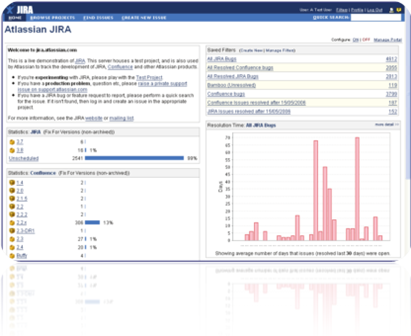
ProjectUsers or Administrators (depending on what rights the Administrator gives each user or user group) can set up Projects in JIRA and create Issues to the projects. A Project can be either a standard project with a beginning and an end (e.g. a software development project), or an area we can place tasks for normal things needing to be done (e.g. an application or "IT Admin").

I have set up the Notification Scheme so that users will get an email when they area assigned to an issue or when someone has added a comment to an issue that is assigned to them. You can set up notifications as you wish. Users can also "watch" particular issues and be emailed whenever anything changes. You can even email JIRA to open a new issue or add a comment and email attachment to an issue.

Issue numbers are related directly to the project via a 3-4 letter prefix. For example, you might have a project called "IT Administration" and a project called "Worldwide Enterprises Project", which will have a prefix of IT and WWE respectively. Issues in IT will start IT-1, IT-2 etc. and issues in WWE will start WWE-1, WWE-2 etc. so it's easy to know what project an issue relates to. You will find the team with a new vocabulary of words like WWE-193 and IT-22 arising in every sentence.

Users can log work against issues and time tracked.

Workflow
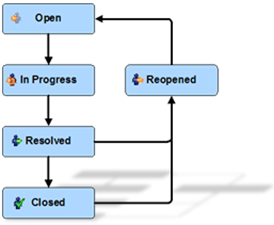
image The Enterprise version has a number of tools that allow you to create and change the workflow, however we opted for the standard which uses a good workflow.

With the standard, an issue is Open when it is created. Once a developer starts work on it, they can change it to In Progress, unless its a small issue that is completed in less than 30 minutes - they can then just go straight to Resolve.

I have set it so that only myself and QA can Close an issue, but anyone can Reopen it for any reason.

Issues are never deleted, only closed.

Issues can be Resolved in a number of ways and the user is presented with the following in the Standard JIRA, the other JIRA versions allow you to add to or change these :

  • Fixed (default) : A fix for this issue has been completed to the satisfaction of the user
  • Won’t Fix : The problem described is an issue which will never be fixed (e.g. the issue relates to a previous version and the workaround its to upgrade)
  • Duplicate : The problem is a duplicate of an existing issue (user can link the issue to another)
  • Incomplete : The problem is not completely described. Used only if the creator of the issue cannot supply any further information (i.e. the creator is no longer available or all attempts to contacted have failed).
    Normally, if the problem is not described correctly, it is up to the user to reassign the issue back to the creator with more questions as comments
  • Cannot Reproduce : All attempts at reproducing this issue failed, or not enough information was available to reproduce the issue. Reading the code produces no clues as to why this behaviour would occur. If more information appears later, the issue may be reopened.

Searching

Users have two ways that they can search for an issue or comment.

"Quick Search" is a seemingly insignificant little search box up the top right of the screen that is extremely powerful. Type anything into there (like "VPN Connection") and JIRA will do a very fast search of all its issues and give you a list of all issues contain that word or phrase. If you know the JIRA number, just type it in and you'll be taken directly to the issue.

"Find Issues" is a menu item that allows you to find issues by creating a Filter. Filters can be created on the fly, saved to a name (e.g. "All Unresolved Development Issues"). JIRA will automatically add a Filter to show you all issues currently assigned to you.

Setting up these Filters is a simple idea of selecting from the list of selections for the fields to search, for example, selecting 1 or more projects to search. Other areas in this search is the Query on the Summary, Description and Comments fields. Query is a reasonably powerful search facility explained Here. Date and time fields have the ability to enter either specific dates, or relative dates (within the last x hours/days, in range from/to). This allows me to, for example, set up a filter to report on all JIRA issues created last month (don't tell my boss that my monthly management reporting is that easy).

When you activate or view a Filter, it shows in a list that you can scroll through and export to Excel or Word, and

Filters can be set up to appear on your JIRA Portal.

The JIRA Portal

The front screen in JIRA can be set up differently by each user. You can add, delete, and move items around the screen to suit yourself. You can add Filters that you created yourself and add pre-set Portlets. These include such things as Project Stats; Admin functions; Filter Stats; My Watched Issues; and Issues in Progress. These can be arranged as you like with the most used Portlets showing at the top of the screen.

My own Portlet shows some details about projects; lists all my save Filters; Overdue Issues; Issues update within the last 8 hours; Resolved issues awaiting me to Close; Issues I'm watching; My assigned issues; and a few of the available graphs that I got from a free JIRA Plugin available from the Atlassian website.

Using JIRA

After using JIRA now for a few months I can honestly say that I have resolved a number of team issues here. I know what is happening; what the team is working on; issues are tracked and comments are added as new information comes in or things are done; the developers and BA can fully understand issues with a place to keep documents, screenshots and comments; work can be prioritised; and everyone can see what work lies ahead of them.

Nothing gets forgotten; work is logged against issues; issues are assigned to others where necessary within the workflow; and management reporting is completed.

The Down Side

image Of course there's a downside -  it costs real money. JIRA comes in Standard, Professional and Enterprise editions costing US$1,200, US$2,400 and US$4,800 respectively. While I would have loved the Enterprise edition, we are getting by quite nicely on the Standard edition.

You will have to keep on top of it when you first install it as there is a mind-set that says "I've assigned this issue to someone else, it's no longer my problem". It's also easy to simply ignore issues assigned to you and then get upset when you have hundreds of issues in front of you.

Summary

As I said, "JIRA works". Sometimes it comes down to that. As a Development Manager I can trust it, the developers trust it, and everyone in the company trusts it.

Try it out for free on your server for a month or two. They'll extend the free trial if you ask them nicely, but I don't think you'll need it. It's so nice to find nice people who actually support and use their product themselves.


Just a quick note: I have no affiliation with JIRA\Atlassian . I don't know anyone there and I don't get anything free from them .. although a tee-shirt wouldn't go astray (HINT HINT Atlassian - Grin).

Wednesday, 17 October 2007

Tools for the Development Team - SourceForge

SourceForge

SourceForgeSourceForge (http://sf.net/powerbar/sfee/) was the real contender against Jira and we took a good hard look at it, putting it through its paces. The price (free for less than 15 users) was a compelling argument, as was its document storage and version control of those documents. We installed it on a server here and the team had a play. The following are our findings.

Initially we found SourceForge (SF) very slow. This was perhaps related to the fact it was set up as a virtual machine. This also meant that it was many gigs to download.

There was a small learning curve, same as any new product I suppose. The one thing that threw me immediately was that Tasks is not the area you place issues. Within a project, you can "create" new Trackers, and its in that new tracker area off the Main Menu where you can now track issues, or "Artifacts" as SF calls them. I'm not sure that I like the term 'artifact' as I don't want issues buried for centuries for some scientist to dig up to find out how we performed our work.

You create fields or use the defaults, you can categorise tracker items and the items are also colour coded to show their priority. You can even ask tracker to auto assign different categories to different people. While the auto assignments worked very well, I wanted to auto assign depending on the development process - e.g. auto assign to me all new issues and I can then distribute them to the available team member, then auto assign to QA when the issue is resolved. However, this is another system and what it offers is good.

SourceForge has several areas of concentration:

  • Tracker - an issues register
  • Documents - a document control system where company and technical documents can be stored, and a sort of version control is applied (more about that shortly)
  • Tasks - These are project tasks as opposed to software issues.
  • Source Code - links to Subversion or other source/version control systems
  • Discussion - a nice discussion forum with threaded messages
  • Reports
  • Release Packages
  • Wiki
  • Project Admin

foldersDocuments

The document control was a really nice feature that we gave high marks to. I can add folders and sub folders and place documents in them, just like Windows. The main difference here is that when I go back and add updated files into the same folders, instead of overwriting the files as Windows does, SF treats the newer files as new versions of the older files. I can then review previous versions, almost like I was in a Version Control program.

Discussions

The SF discussion forums were a nice touch. You can associate a discussion with a tracker artifact, people can reply to discussions and you

can select to "watch" a particular discussion to get an email when someone adds to the discussion. You can also have it automatically sending out to a mailing list.

There were a couple of downsides to the discussions. When replying to a comment, you can not see the discussion you are replying to. This will surely cause a lot of mis-quoting. Also, it seems that the user is unable to edit their own discussion after posting so even if they find they have misquoted, they can't edit that to change it. While I can understand not being able to change a comment if another has replied, surely you can edit to change that spelling mistake or typo you noticed in that frozen moment after you press save and before it was redisplayed.

File Releases

It is a convenient tool to package files in a patch set. You could upload all the files needed for a patch and when pressing the downloading release button, it saves all files into a zip file. Good for patches but I'm uncertain for major releases.

Reports

Reports can be defined to report on any searchable criteria. A standard report of a graphical summary and the report detail will then be generated. Reports can be on Tasks (project) or Tracker Artifacts.

Wiki

The Wiki was a disappointment. It was a simple and very basic Wiki without even the ability to add graphics other than as a URL. It has a different command set than I was used to but as it was so limiting, it wouldn't take long to learn.

General

It had a nice interface and some nice additions when compared with Jira, however when even after 2 weeks the company still could not reply to even a standard sales enquiry (sent by two of us separately), we were left wondering about the likelihood of any response to a real support query. That was the real clincher as far as we were concerned. Sadly, we dropped SourceForge from our list.

Tuesday, 16 October 2007

Tools for the Development Team (2)

coffeeprocessTo continue where I left off, the management team, of which I am a member, looked at Jira in a totally different manner. Each person had their own needs for a tool ever so slightly different to Jira. This caused some problems as I was then asked to evaluate a number of other tools that, perhaps with some compromise, everyone can use. Some suggestions were forthcoming and I dutifully took at look at each one.

The problem with the approach that I made to the management team was that I had obviously failed to impress what the development team needed in the tool. You see, I was out to sell the tool to the rest of the company and in doing so I was focusing on their needs instead of the development team's. This meant that instead of learning how the development team were going to contribute and communicate better, they were thinking "how can I use this new tool", which invariably led to "I need this tool to do X, and I know one that does X much better than this". Of course, that meant that they were thinking of their own needs and Jira just didn't cut it for them. Dang, I missed the plot there.

I got suggestions to consider like Phpaga (http://www.phpaga.net). This is an excellent tool for contacts, invoices, financials, and billing tasks, but it has little to nothing to do with the development process. After discussing this and writing up a small review for the management team I suggested that a CRM package was more in line. They have one so will look again at using it effectively.

Almost all applications I looked at served a single particular purpose, and added some other purposes somewhere along the scale of between "ok" and "that really sucks".

So lesson learned. What I should have done is sold it as a development tool. I could have shown the management team how much better the development team was going to be, how much more accountable, how they will now get both statistics and answers from this bunch of strange speaking weirdos that did things magical and totally unknown things that produced the final products. Now they might understand what's going on there and the tool will be well supported.

As I stated in my last post, I have a number of tools that I will touch on briefly over the next few posts, but as you might have guessed, we have finally decided on Jira. Surprisingly that decision was not made by me. The development team were also asked to review a few of the more successful tools and give their feedback but it was their own decision that we should go with Jira. While Jira did not have the nicest interface or the best reports, and it was only an issues register, it was voted in as the tool to use.

Friday, 12 October 2007

Tools for the Development Team

We placed Jira onto our live server and began using it for real about 2 weeks ago now. So how's it going? Rather well as it turns out.

(Jira is from Atlassian (http://www.atlassian.com/software/jira/) and is an issue tracker tool, see earlier posts for discussions.)

I did a demo for the Development Team and they took to it like a duck to water, now that they understood what it's used for and how. I did the same for the rest of the Management Team and they took to it as well, but in a different way.

Initially it was not used as well as I'd have liked so I put a little pressure on the team by being a bit of a pain in the neck for a couple of days..

Me: "What are you working on?"

Developer: "I'm updating xyz here that needs a new abc because Freda from WxyCorp has found a glitch with it"

Me: "I don't see this in Jira, have you added it?"

Developer: "Um... (ticidatacida) .. I have now (grin)"

Me: "Oh, OK then. You know that if you are working on anything, no matter what it is, it .."

Developer: ".. yea yea, I know, - ..'it needs to be in Jira' (sigh)"

The developers are good guys and they really understood the reasons for putting everything in Jira but being developers, they wanted to just develop. Now I note that no-one is working on anything without a Jira issue and they themselves police that nicely by suggesting that others create a Jira issue before they can start on any work. Nice.

This means of course, that all work is logged and reporting and reviewing can be carried out. Issues are assigned to others with questions when more information is needed, and they get an email to tell them when the issue is reassigned back to them with the answer. Once the have completed the work, they "Resolve" the issue and assign it to the QA Manager. Only the QA Manager and myself as Administrator, can "Close" an issue.

The Management Team has been impressed with Jira but they all have their own ideas of other tools that would work better for what they want to do. Some other tools that I have looked at are...

Other areas I have also look at with a mind to solving some other issues here, they include...

and I'll hope to have others added to that list soon.

I'll talk on each of those and our eventual decisions as I go along in other posts. In the meantime, I'd like to hear what tools you are using with your team or even on your own to help with development and running a software team.

Friday, 21 September 2007

Back again

Thanks for your patience, I have finally shifted house and started my new role as Software Development Manager for a software house in Hamilton.

The shift included a few days in Wellington visiting friends and generally spending time away. Holidays have been a very rare occurrence for me, having at one time, spent more than 12 years without a holiday, I find that taking a break occasionally is a requirement.

The new role is interesting. Based on Oracle technologies the product is a very stable and sizeable system. The team contains some excellent technical expertise and I will be working hard to install some processes and a decent methodology to ensure that they are supported as much as possible.

That's all for now as I'm still finding my feet here.

Thursday, 23 August 2007

Have an iif() function in Delphi

There are many advantages to learning other programming languages, but there are also some problems as well. The "Immediate If" (iif) function is one of those. In most, if not all, the other languages there is an immediate if function that makes programming just a little easier and allows you to say things in much less lines. Consider the following...

    if Str = 'Top' then
s := 'Woohoo!'
else
s := 'Climb some more';


While in Delphi we can effectively write this on one line as...

    if Str = 'Top' then s := 'Woohoo!' else s := 'Climb some more';


This looks untidy. If we were using another language with immediate if, that would look like this...

    s := iif(Str='Top', 'Woohoo!', 'Climb some more');


Now I realise to some Delphi programmers that are not multiple programming language experienced, all that seems a little esoteric but it is standard use in even Excel. Here's how it works...

iif(condition, TrueResult, FalseResult) : String;


The iif() function first looks at the boolean condition. If that condition is true, then it return the TrueResult, and if it is false, then it returns the FalseResult. Here's the declaration

function iif(Test: boolean; TrueR, FalseR: string): string;


The 1st parameter is the Test condition, this can be anything (e.g.: x > y).
The 2nd parameter is the string to return if the test condition is True.
The 3rd parameter is the string to return if the test condition is False.

Here's the full function...

function iif(Test: boolean; TrueR, FalseR: string): string;
begin
if Test then
Result := TrueR
else
Result := FalseR;
end;


but in other languages, the 'type' we return can vary. For example we may want to return 99 if true or 0 of false. How do we do that in Delphi? By using the 'overload' directive.

function iif(Test: boolean; TrueR, FalseR: string): string; overload;
function iif(Test: boolean; TrueR, FalseR: integer): integer; overload;
function iif(Test: boolean; TrueR, FalseR: extended): extended; overload;

Implementation

function iif(Test: boolean; TrueR, FalseR: string): string;
begin
if Test then
Result := TrueR
else
Result := FalseR;
end;

function iif(Test: boolean; TrueR, FalseR: integer): integer;
begin
if Test then
Result := TrueR
else
Result := FalseR;
end;

function iif(Test: boolean; TrueR, FalseR: extended): extended;
begin
if Test then
Result := TrueR
else
Result := FalseR;
end;


We can even extend these to bytes or even TObject if we want to. The only thing we can't do is have the same parameter types and return a different type, e.g...

function iif(Test: boolean; TrueR, FalseR: string): string; overload;
function iif(Test: boolean; TrueR, FalseR: string): integer; overload;


This is a no-no. Why? Delphi will decide which function to run based on the parameter types. If all the parameter types are the same, Delphi will not compile as it will see this as an error.

As already stated, Delphi decides which function it will used based on the types used in the parameters. It will always use the least type for the job. For example, if you have iif()'s set up for both integer and byte, and then use iif(x=y,5,10), then Delphi will use the byte function and return a byte. In most cases this will still work ok even if you are expecting an integer returned.

Thursday, 16 August 2007

Practical Development Methodologies

Over the years I have designed and installed a number of development methodologies into various organisations (I'll not list them here). What I'm interested in is a description of the development methodology that is adopted by your company, why, and how well its working.

I'd also like to know your description of the development method, not just the company's blurb sheet. For example, I was once working for a company who was the major client of a software development company. I was asked to report on the development methodology that the software company had adopted and how well it was working in favour of the client.

The company, like a great many others I know, proudly advertised their methodology as "Agile". Agile is not itself a methodology but rather a concept. There are a number of methodologies which come within the concept of "Agile". Upon investigation, the company was operating under "Iterative and Incremental Development" (IID). After getting to know both the development company, and the client, I was able to report that the IID methodology worked exceedingly well for both the development company, and their major client in this case.

In most of the methodologies I have installed, I have yet to install a stock-standard, out of the book methodology. I much prefer to look at several areas within the company I am contract to, to ensure a good fit. These areas include:


  • How the programming team currently works, what works well and what needs improvement.
  • The major applications that the team completes, e.g. large developments that take longer than 6 months to deliver, or daily support and enhancements to legacy applications.
  • The major clients of the team. This may be serving in-house applications (in which case the customer may be another business area) or small, large, or corporate external customers. each has its own unique needs.
  • The slant that management wants to portray to the outside world.
  • Both the history and the perceived future of the development team.
  • The history and quality of the delivered products.
  • The location and proximity of the team. For example, some companies I have worked with perform all their development in India with local staff consisting of Business Analysis and Technical Architects. Others have split their development team between two cities.
  • The makeup of the team. Some teams may have 'prima donna' programmers that simply will not conform to changes unless they are subtle or suit their own needs.

All these will have an effect on the eventual development methodology that will be designed and installed.

One example of a change to the standard methodology was where I designed and installed a standard Waterfall methodology to cope with external programmers, but changed the process to be used for Functions, instead of whole applications. This reduced the time it took for the external programmers to return their first cut that could be tested and, where necessary, returned for minor alterations. This meant that for any application there were several waterfalls operating at any one time. A sort of RAD-ified, or even XP'd Waterfall.

So what's your advertised methodology? What's your actual methodology? How well does it work for the team? And how well does it work for the client/customer?

You don't need to tell me the company you work for, and in most cases it may not be prudent.

Wednesday, 15 August 2007

The Shell Sort

Yes, I know Delphi comes with a number of sorting routines, but I thought I'd describe a shell sort as it is fascinating little sort routine that is easily understood and a very fast routine.

[Steve: Although the "Shellsort" algorythm was first published by Donald Shell (as pointed out by Anthony Mills, thanks Anthony), this 'Shell Sort' uses a different approach that would be closer to a "Bubble Sort" with some changes. I therefore take a little 'artistic licence' in describing it in ways that people can visually understand]

The name "Shell Sort" comes from those games that are played by the magician, conman, or simply the swift of hand when they try to get money from the average passerby. Having usually 3 shells, a small coin or marble is placed under one of the shells. The shells are then swapped around at speed and the passerby is asked to bet on which shell contains the marble.


The shell sort routine does that same swapping around, but only to place all the shells in order. Consider that each shell is numbered, in this case, 1 to 5, but we'll first get our 'swift of hand' guy to jumble them up a little.


For the purposes of this blog, I'll limit the sort to only 5 integer numbers (or shells) although these could be words or extended reals or whatever. So long as you can compare them to see which is the greatest, this routine is the same or similar.

What this routine does is traverse the 5 shells many times. Each time, it will check each shell and see if it is greater than the next shell, if it is, it will swap the two shells. This will have the effect of moving the largest numbers to the right and the smaller numbers to the left - in other words, sorting them.


Consider the first time through, looking at each shell in turn, and swapping them with the next if it is larger, would, by default, move the largest number to the end.

Lets take a look at what will happen on the first run through.

35241 (look at 1st number, swap if 3 > 5)
35241 (look at 2nd number, swap if 5 > 2)
32541 (look at 3rd number, swap if 5 > 4)
32451 (look at 4th number, swap if 5 > 1)
32415

This moved the largest number (5) to the end. This means that the next time through, we would only need to look at the first 4 numbers, and so on until there is only one number left. That will tell us that the shells are sorted. BTW: Did you notice that we only stepped throuigh the first 4 numbers? That's because the last number is, well, it's the last number and doesn't have a next number to compare to.

Another way to know if they are all sorted (after all, we don't yet know if they are in order before we start) is if we traverse the shells and none needed to be swapped. If we didn't swap any then its in order and we can stop.

Let's start. Create a new project in Delphi with a form. Drop a TMemo and a TButton on the form. We'll put all the code on the OnClick event of the button, so we can follow it easier. First declare the counters; the shells themselves; and a true/false variable to tell us that no swaps were made during the last traversal.


var
i, LastShell: integer;
Shell : Array[1..5] of integer;
NoSwap: boolean;


Then we'll place a procedure inside the OnClick event (something that I would not normally do, but we're keeping it all tight for you). This procedure will simply display the current state and order of the shells so we can see what's happening.


procedure ShowShells;
var
i: integer;
s: string;
begin
// display the shell order in the TMemo
s := '';
for i := 1 to 5 do
s := s + IntToStr(Shell[i]);
Memo1.lines.Add(s);
end;


Go on, say ShowShells shix times quickly. Then we'll add another procedure. This one will swap a shell with the next and tell us that the swap occured.


procedure Swap(var First, Second: integer);
var temp: integer;
begin
Temp := First;
First := Second;
Second := Temp;
NoSwap := false;
end;


Note that I declared variable parameters, but I also could have swapped the array directly. Either way would have been acceptable in this situation.

Now we can start writing code in the OnClick event itself. First we'll fill the array with the current order of the shells.


begin
Shell[1] := 3;
Shell[2] := 5;
Shell[3] := 2;
Shell[4] := 4;
Shell[5] := 1;
memo1.Clear;
ShowShells;


Now we can do the actual sorting, using the counters. Remember, we are going down in the number of shells we need to sort each time (the largest will move to the end each time).


memo1.lines.add('now sorting...');
for LastShell := 5 downto 1 do
begin
NoSwap := true; // No swaps this time through yet
// traverse the unsorted shells
for i := 1 to LastShell-1 do
begin
if Shell[i] > Shell[i+1] then
// its greater than next, swap them
Swap(Shell[i], Shell[i+1]);
ShowShells;
end;
if NoSwap then
// we traversed the shells and didn't need to swap
// any therefore its sorted and we can stop.
break;
end;
memo1.lines.add('Done');
end;


Note that we only traversed the shells to LastShell-1? that's because we can't look to swap the lastshell with the next one as its the last shell :-)

Here's the full code...


procedure TForm1.Button1Click(Sender: TObject);
var
i, LastShell: integer;
Shell : Array[1..5] of integer;
NoSwap: boolean;

procedure ShowShells;
var
i: integer;
s: string;
begin
s := '';
for i := 1 to 5 do
s := s + IntToStr(Shell[i]);
Memo1.lines.Add(s);
end;

procedure Swap(var First, Second: integer);
var temp: integer;
begin
Temp := First;
First := Second;
Second := Temp;
NoSwap := false;
end;

begin
// assign numbers to the array
Shell[1] := 3;
Shell[2] := 5;
Shell[3] := 2;
Shell[4] := 4;
Shell[5] := 1;
memo1.Clear;
ShowShells;
memo1.lines.add('now sorting...');
for LastShell := 5 downto 1 do
begin
NoSwap := true; // No swaps this time through yet
// traverse the unsorted shells
for i := 1 to LastShell-1 do
begin
if Shell[i] > Shell[i+1] then
// its greater than next, swap them
Swap(Shell[i], Shell[i+1]);
ShowShells;
end;
if NoSwap then
// we traversed the shells and didn't need to swap
// any therefore its sorted and we can stop.
break;
end;
memo1.lines.add('Done');
end;

Tuesday, 31 July 2007

Delphi/Pascal Through the Ages

(I apologise that this is a long post. if you are in a hurry, then please at least read the last 3 paragraphs)

Delphi started out life as Turbo Pascal on CP/M. For those of you old enough to remember, CP/M was prior to MS-DOS, which in turn was prior to Windows. While getting to grips with Pascal MT+, I saw an add for a new compiler called Turbo Pascal in the very early 1980's and I bought myself a copy.

From this simple, small and very fast compiler I wrote a small business accounting program that I sold on the Amstrad Computer. I used some code I found in another Borland addition called 'Database Toolbox' to add file and indexing routines.

It was about mid 1980's that my accounting program The Trader Series had a serious following in New Zealand amongst Amstrad computer users and I decided to devote all my time porting it to MS-DOS, I gave up my job as Marketing Manager for Panasonic Computers in New Zealand to become a programmer. Coding in Turbo Pascal was fun. There were several enhancements since that first version 1 that I purchased, these included such powerful things as Overlays. We were restricted to 640 Kilobytes of memory so using overlays I could now write much larger programs.

There were also a lot of third party programs and additions around, including a simple debugger which helped me a great deal. "The Trader Series", the accounting program I wrote, expanded to five separate modules and over half a million lines of code. Having much greater access to memory, I totally rewrote the screen handling so that all screens were built in memory and "shifted" to the screen, making it seem lightening fast for the user. I also abandoned Turbo Toolbox and rewrote the indexing system with a doubly linked, self-balancing B++ tree. These enhancements, along with using linked lists for transactions made it the fastest accounting program on the market at the time.

I remember running a demo for the company I selected to distribute the program (I decided that I can't be both a programmer and salesman/marketing person). Their high end product took as much as 30 to 40 hours to run an end of month process. I had built up a database of 30,000 debtors, each with about a dozen transactions. After the demo they asked me to perform an end of month and turning to leave, asked when I would be back in to see the result. I told them it had been done. I spent all afternoon proving that it could run an end of month process in less than a minute. That program won the New Zealand Computer Software Awards in 1987 and became New Zealand's largest selling small business accounting program for the next 10 years.

Turbo Pascal was a great language. Object Pascal raised its head in version 4.0 and I stayed with Turbo Pascal until I sold The Trader Series in 1990.

By now Windows was getting a grip and I needed to move into this arena. Borland's Pascal for Windows just didn't do it for me. I went with a number of other languages including FoxPro, C++, Visual Basic, and I even tried a new language called Java (it'll never amount to anything but hype, or so I thought - Sigh, I have been proven wrong before).

Borland then introduced Delphi and I managed to get myself a pre-release copy. Finally a great environment. Something that equaled the environment of Turbo Pascal when it was first introduced. Delphi however had a much larger price tag, but I purchased anyway and was thrilled with the power that even this first release had. Delphi was written in Object Pascal and the source code was included. You could learn lot with that source code and programmers were able to write their own components. The Component market was created with many outstanding components pretty soon there were thousands to choose from.

Delphi, the new Turbo Pascal, was alive and kicking again. I was a contractor through the 1990's and contracted to many different companies and corporations and was able to persuade more than a few to look at Delphi for their future needs (where appropriate).

While Delphi was indeed an excellent development environment, I was more and more disappointed in its growing price tag. By 2003, Borland had priced itself completely out of the market. The price for Delphi was now about the same price as a good second hand car in New Zealand and more than almost all other development environments.

I could no longer afford my favourite development language and companies everywhere in New Zealand were coming to the same conclusion. Sadly, I was shifting to Microsoft and C#. I still had, and still use, Delphi 7, but the call to C# was strong as the companies left Borland, and as Borland lost interest in Delphi. I could not find work as a Delphi contractor any more.

Earlier this year, I was invited along to the Delphi 2007 pre-release roadshow. There I learned that Borland had shifted Delphi into a separate company and concentrated on its team tools. CodeGear had been created to take over Delphi as its flagship product. Personally I thought it should have been the other way around, but that's the way it is. The price of Delphi was dropped by several thousand from what it was in 2003, and it had been given several enhancements since I last saw it in Delphi 7.

I saw this as a resurrection of Delphi and a possible push to get Delphi back to its space as one of the top programming environments. They have a long way to go to get back the loyalty that they once had. Companies had dropped them and now few companies will look at Delphi again.
However, in my intervening years with other development environments I have learned a few things: A team of 3 dedicated Delphi developers can totally outperform a team of 40 developers in Java and other Microsoft languages for a similarly large corporate application - by a factor of several months. I have also learned that, although Delphi can do .NET, Win32 can often deliver to the customer a far superior product, much more aligned with the customer's needs, in a much reduced timeframe/cost. And I learned that even a single developer armed with some excellent Delphi tools, can take on the giants.

CodeGear, your work now is not with enhancing Delphi (other than in the helpscreens), its marketing that will win the lost corporates and large companies back. You won't win them all, the "We're a Microsoft Shop" syndrome is too well entrenched for that. But you can win over a lot and make your headway in the world again, and give back the power to the average programmer.

I must admit, it's nice to be able to get back to programming without fighting the tool every single step of the way.

Wednesday, 25 July 2007

Getting the Time to Program

How many others have the same problem?

I have a number of ideas that I would love to program in my spare time. I have produced many retail programs previously with success so know the pitfalls. I have worked out most of the kinks in the logic of how to implement many of the features. I just need to program them.

The problem is that I spend a great many hours in the day programming at work. New Zealand is known for being a wonderful place to live, but its also getting known as the hardest working. Us poor Kiwis (the kiwi is our native bird and also the name we call ourselves), have the second highest rate of average hours worked per year compared to all other OECD countries. This means that when I get home, I am in serious need of relaxation and the things I want to program get put off for another night.

I have some wonderful ideas that I know will be good sellers, I just need the time to program them. Often the time I do spend on these ideas at home, ends up as code that is used in my work programs. This keeps the boss happy (I hope), but doesn't get my programs finished.

Mind you, with spending every weekend with my Fiance and her daughter, and spending about an hour on the phone to her every night (we live in different towns) does not help the situation so I suppose I'm my own worst enemy.

How do you make sure that you put aside the time and energy to program in the evenings?

Thursday, 19 July 2007

Different Programming Styles

I was reading Serge’s Blog on Programmers and Temperaments this morning and it reminded me of a project I did for a company in Wellington once. It was a large international company (no, I'm not going to tell you which) and they had a very large project that they needed to produce. The project was technically difficult requiring a lot of thought each step of the way.

After a lot of design by their chief software architect, they called for programmers. About twelve of us were hired for this one project and it was really fun to get to work with a number of others on one project like that. We were given regular daily meetings to try to bring us all up to speed on the technical requirements, and then shown to a large, open plan room with a computer on each desk to choose our own work area.

What was most interesting though was a discussion that I was having with the project manager about a week later. He commented on the work styles of each of the programmers from the perspective of an observer. This wasn't a moan or gossip session, but a discussion on a real observation.


After all the meetings and the whiteboard sessions were over, we all drifted into the desks and work practices we wanted. The project manager observed the following different styles...

I found my niche in a corner desk that was on its own, then got out my pad and spent the next 2 days planning what and how I was to approach my part of the project, before I even touched the keyboard. I wanted to completely understand the requirements (which were mostly in the architect's head, given out on the whiteboard sessions). Once I understood and had a clear plan, then it was a matter of programming.

Two others immediately grabbed two desks that were joined to each other so they were sitting side by side, then simply pulled one chair over to the other desk to together at the same desk, one computer between them, and designed and programmed together. They needed to talk through what they were doing and help each other plan and program. Occasionally the second programmer would move to the computer on the other desk to program a sample procedure to help explain to the other his thoughts on a subject.

Another programmer sat down at the first available desk and started pounding out code. He needed to try out various prototypes and work from there, building up his code as he went.

Various others worked somewhere along the spectrum of the above three different styles. Some couldn't handle it and after a few days left for greener and much easier pastures.

What was interesting over the following several months was the general effectiveness of the different styles. I (admittedly somewhat surprisingly as there were some seriously experienced programmers that I enjoyed working with) ended up producing the end result much faster, followed by the pair/buddy approach. The person who immediately started coding, had to change and restart so many times that he turned out to be the least effective.

I'd love to hear your comments on what you have found in your experiences.

Wednesday, 6 June 2007

Storing database fields to a TComboBox

While there is a TDBLookupComboBox that allows the developer to attach the TDBLookupComboBox to a table directly, it does have some issues in its use. I prefer to use a normal TComboBox and feed it from a Query. It is then a standalone ComboBox that can be used for more than just updating a field in one table with a field in another.

But how do I fill the ComboBox? And once filled, how do I know which record the user has selected?

First the Query. I am assuming that, like me, you create a field in every table that is filled with a unique ID. I can use this ID in other tables to create a join. For example, I may have a Customer table ...

CustomerID: Integer
Name: String (e.g. VarChar)

Lets say I want a ComboBox of all my customers for the user to select. The query would look something like this ...

SELECT CustomerID, Name
FROM Customer
ORDER BY Name

I am always sure to ask for the ID first and then the text that the user will want to see. Now lets fill the ComboBox with that detail. Because I may wish to do this with many comboboxes in my application and with many different queries on other tables, I have built a procedure to fill the ComboBox using AddObject.


Procedure FillCombo(cb: TComboBox; Q: TQuery);
begin
cb.items.clear;
Q.First;
while not Q.Eof do
begin
cb.Items.AddObject(Q.Fields[1].AsString, TObject(Q.Fields[0].AsInteger));
Q.Next;
end;
end;


Now I want to use that procedure to fill my ComboBox.

FillCombo(cbCustomer, MyQry);

So how then can we tell which record the user has selected? Simple, I have created a function that will return the ID of the selected record, in this case the selected Customer. If none has been selected, it will return -1.


function GetSelected(cb : TComboBox) : integer;
begin
if cb.ItemIndex = -1 then
result := -1
else
result := Integer(cb.Items.Objects[cb.ItemIndex]);
end;


So all we need to do is call it.

CustomerID := GetSelected(cbCustomer);
if CustomerID = -1 then
// none selected

Tuesday, 22 May 2007

Global Variable Rant

Taking over someone else's programs is never an easy task. I'm not about to judge the programmer as I was not there for the decisions made, or the time pressures and stress that was going on at the time.

However, I will ask every fledgling and seasoned programmer out there to spare a thought for best practice techniques. Trying to read code where extensive use of global variables are used is well nigh an impossible task.

Instead, create objects and define limits within those objects using such things as Sets (e.g. TMyStatus = (stActive, stInactive, stPaused);) and/or comments which allow another person to know what is happening. Please use variable names that can give some indication as to what its used for. Variable names like glbBoolsghSet02 (I made that one up) tells another programmer nothing.

Good commenting IS needed even in good Delphi code. I'll leave explaining what I mean by good commenting in another blog a little later.

Enjoy life, there's reason in that madness - its just buried a little deeper in some objects.

Too many tabs? Too much code?

I've been working on a project that has a number of tabs on the form. With two or three tabs, the full code for these can be included in the forms unit without a problem. But when you are adding more and more tabs, either you are going to have to rethink your user interface or have one big mother of a unit with a gazillion lines of code.

There is another way that I learned a number of years ago - place each tab on a different form. "What? But that's nonsense Steve, you've been smoking something!", I hear you say. Not so. Follow along for a tricky bit of coding.

Create your form with all your tabs - just don’t put anything in them for the moment. Now for each tab, create a totally separate form, place a TPanel on the form and align it to Client. Give that Panel the same name for each form so you'll remember it, like MainPanel. Then create all your components onto the MainPanel and add your logic code to that form.

Now, going back to the main form with all the tabs, in the OnChange event of the Tabs, place something like the following code...


procedure TfrmMain.pcMainTabChange(Sender: TObject);
begin
case pcMainTab.TabIndex of
1: FrmOne.MainPanel.Parent := tsOne;
2: FrmTwo.MainPanel.Parent := tsTwo;
3: FrmThree.MainPanel.Parent := tsThree;
end;
end;


And there you have it. Simple isn't it?

the tsOne, tsTwo etc are the names you can give to the individual TTabSheet you want the form's components to appear on.

What is happening here is that you are changing the parent of the MainPanel to the TTabSheet of the tab you want it to appear in. By changing the parent, you are actually telling it that it now lives on that new tabsheet instead of the form. All the code will still apply.

All the logic code for each tab is in a separate form, kept tidy and easier to follow.

You can add code to create the form at runtime if you wish, but remember to free it again in the OnChanging event.

God bless and have a wonderful day.

Monday, 21 May 2007

Accessing multiple edit Components

I was asked by a friend how he could access all his components without a long and hard to maintain list in the Source Code. He had a number of Edits on his form and he wanted to add all the edits up, knowing the were all set to receive integer values.

Here's how he can do it...


function GetEdits : Integer;
var
i : integer;
comp : TComponent;
begin
result := '';
try
// fMain is the main form.
for i := 0 to fMain.ComponentCount - 1 do
begin
Comp := fMain.Components[i];
if (Comp is TEdit) then // its an edit component
if (Comp as TEdit).Text <> '' then
Result := result + StrToInt((Comp as TEdit).Text);
end;
except
result := -1; // Oops, that edit was not a number
end;
end;


Wednesday, 7 March 2007

Welcome to my Blog

Gidday, and welcome to my Blog.

This blog will mainly concentrate on Delphi code examples, news, personal experiences with Delphi, and with things I have learned, like remembering to take your keys with you when you go out - it only takes the click of the door behind you to remember that you can't get back in without them.

I've been using Delphi since version 1.0 of Turbo Pascal waaaaay back. I was even using something called Pascal MT+ before that. I've used many languages over the years, including Basic, C, C++, dBase and all its hybrids like Foxpro, Visual Basic, Java, JavaScript, Perl, DataFlex, Modula 2 ..... The list goes on. However, underlying it all I kept returning to Borland's Delphi.

IN the 1980's I designed and wrote New Zealand's top selling suite of small business accounting programs - that's more than 500,000 lines of code in one release - on my own. No other language could cope with a single programmer managing that many lines of code. I wrote everything from the file handling (indexes, files, linked lists etc.) to the screen and memory handling - all in Turbo Pascal. Since then I have seen numerous examples of very large applications written and running very well in Delphi.

Since selling that accounting suite, I have been a consultant to many different organisations including telecommunications, banks, insurance, logistical operations and others, large and small as everything from Applications developer, Team lead, Project Manager, Development Manager, and even Business Unit Manager. I have enjoyed most thoroughly but never more so than when put behind a computer with Delphi up and running.

Welcome to what I hope to be a regular and informative blog.